
A person inexperienced in project management may think that resource leveling is a method of making use of resources having the same height. Most experienced project managers know that it is a resource optimization technique which tries to make the best use of available resources to create a workable project schedule. Resource leveling is often misconstrued as the only resource optimization technique, but there is another one—resource smoothing.
Resource Optimization
Resource optimization is a scheduling technique that tries to create a near perfect project schedule within the given resource and time constraints.
In resource optimization, activity scheduled dates are determined or adjusted so that the available resources are not overloaded and the project’s target finish date is not compromised.
Resource optimization can be done in one of the following two ways:
- Resource leveling
- Resource smoothing
I have written this article to explain both techniques.
Resource Leveling
Resource leveling is the process of rescheduling activities such that the requirement for resources on the project does not exceed resource limits. The project completion date may be delayed in the process (Max Wideman PM Glossary).
Sometimes a project resource is assigned to more than one activity simultaneously making the resource overloaded. You can resolve the over-allocation by using resource leveling. Level the resources by either delaying the activities or by splitting them.
Let me explain it with the help of an example. Let us consider a small project having five activities—A, B, C, D, and E.
The figure below shows a network diagram for our example project. We can see that activity E is dependent on activities A, B, C, and D. Activity E can start only after all of its predecessors are finished.

Let us assume each activity can be done by a one person in an eight hour working day. The figure below shows the time-phased project schedule.
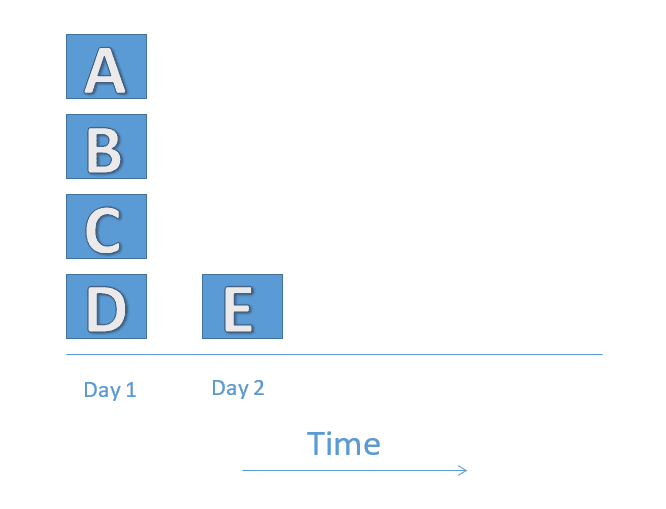
The above diagram is just a network diagram. It is not a complete project schedule, since it does not show assigned resources. Generally a constant number of resources are allocated to a project. Looking at the above schedule only, the project would need four resources on Day 1 and one resource on Day 2 for completion. In this case, four resources would be too many. I’ll explain why.
Let us assume that only two resources (Jane and John) are allocated to the project. Jane and John will work on Day 1 to finish activities A and B and C and D respectively. The figure below depicts the resource utilization levels of these two resources.

Notice that both Jane and John are working 16 hours on Day 1. This is far from an ideal scenario. A resource can work for a maximum of eight hours per day. Hence, the schedule needs to be adjusted.
The following figures depict the resource adjusted schedule with two resources.
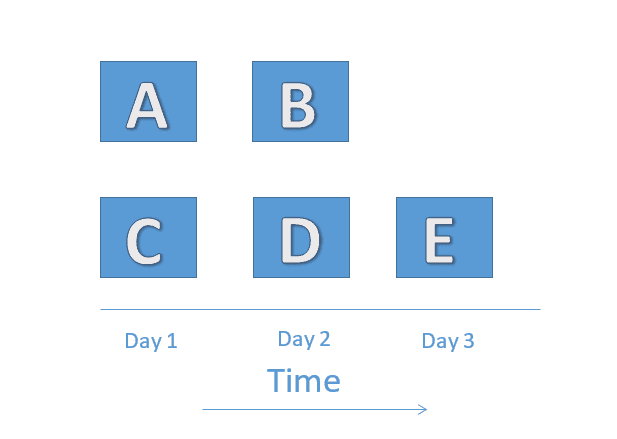
You will notice that activities B and D have been delayed to Day 2 in order to remove the over-allocation. Now, we’ll look at a depiction of the resource utilization level in the adjusted schedule.

You will notice that, in the above figure, both the resources are leveled. Jane and John will each work for eight hours per day.
In resource leveling, resource usage is maintained at a constant level, but the project schedule may be compromised. MS Project has a feature to automatically level the resources. It is very well explained in another post on resource leveling best practices.
Resource Smoothing
The process of rescheduling activities such that the requirement for resources on the project do not exceed resource limits is called resource smoothing. In smoothing, as opposed to resource leveling, the project completion date may not be delayed. Activities may only be delayed within their float (Max Wideman PM Glossary).
In resource smoothing, you have to make the use of available resources to finish the project within the given target finish date. You can use total and free float to adjust the activities’ start and finish dates.
Resource smoothing is much more involved than resource leveling. You can read my previous post on how to use network diagram to understand how total float is used to adjust the project schedule.
As I said before, in resource smoothing, as opposed to resource leveling, the resource usage is maintained at a constant level, but the project finish date is not changed.
Conclusion
You should use both resource leveling and resource smoothing to optimize the resource utilization while developing a project schedule. Usually resource smoothing is done after resource leveling, but they can be done in parallel, too. Generally, resource leveling increases the cost of a project, whereas resource smoothing introduces an extra amount of scheduling risk.
Have you used any of the resource optimization techniques in your project? If yes, what was our experience? I would love to hear about it in the comments below.
